My Kubota4.1.0
Publisher Description



Do More With Your Kubota
Kubota is always looking for ways to support and empower Kubota owners. The My Kubota app is a companion for Kubota equipment owners that gives you the ability to proactively maintain and care for your equipment.
The My Kubota app easily allows the user to:
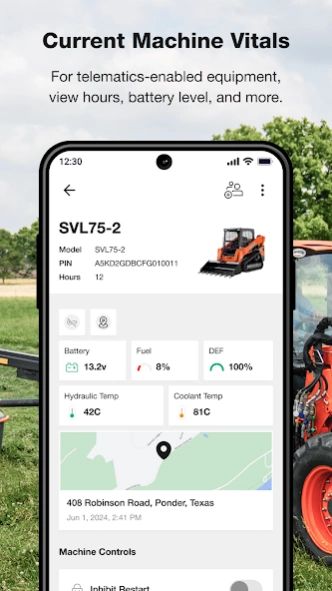
– See the status of your equipment's temperature, fuels, fluids and fault codes.
– Check the location of all your telematics-enabled equipment.
– Create a Geofence to alert you when your equipment leaves you property.
– Keep track of your Kubota equipment
– Browse Kubota equipment user manuals and maintenance intervals.
– Conduct general upkeep of equipment by following along with the self-guided maintenance guides.
– Track maintenance performed to keep your Kubota running like a Kubota.
– Find and favorite nearby dealers for easy reference and contact.
About My Kubota
The company that develops My Kubota is Kubota Tractor Corporation. The latest version released by its developer is 4.1.0.
To install My Kubota on your Android device, just click the green Continue To App button above to start the installation process. The app is listed on our website since 2026-10-01 and was downloaded 6 times. We have already checked if the download link is safe, however for your own protection we recommend that you scan the downloaded app with your antivirus. Your antivirus may detect the My Kubota as malware as malware if the download link to com.kubotausa.mykubota is broken.
How to install My Kubota on your Android device:
- Click on the Continue To App button on our website. This will redirect you to Google Play.
- Once the My Kubota is shown in the Google Play listing of your Android device, you can start its download and installation. Tap on the Install button located below the search bar and to the right of the app icon.
- A pop-up window with the permissions required by My Kubota will be shown. Click on Accept to continue the process.
- My Kubota will be downloaded onto your device, displaying a progress. Once the download completes, the installation will start and you'll get a notification after the installation is finished.
Program Details
System requirements
Download information
Pricing
Version History
version 4.1.0
posted on 2026-10-01
- NEW Maintenance Dashboard: View maintenance intervals, items, and track your maintenance in one easy location
- Calibration experience improvements
- Technical improvements
- Minor bug fixes
version 4.0.3
posted on 2026-08-06
- Minor bug fixes
version 4.0.0
posted on 2026-07-06
- Equipment access sharing
- Incremental improvements
- Minor bug fixes
version 3.9.0
posted on 2025-12-05
- Telematics Plan features (coming soon)
- App Icon / App Name updates
- Updated Add Machine scanner functionality
- Incremental improvements
- Minor bug fixes
version 3.7.0
posted on 2025-04-25
- Incremental improvements
- Minor bug fixes
version 3.6.0
posted on 2025-03-17
New Sign-In Enhancements
– Same Credentials: Use your existing username and password to log in once the update is live.
– New Look, Same Data: The login screen is new, but all your account information will remain intact.
– Sign in with Apple or Google: If your myKubota email matches your Apple or Google account, you can opt for this convenient sign-in method. Your data will seamlessly transfer over.
– Manual Entry: If not linked, just use your same email and password as before.
version 3.4.0
posted on 2024-11-12
- Enhancement: Menu and Settings page improvements
- Bug Fix: Maintenance Tracking Edit Duplicated Record
- Incremental improvements
- Minor bug fixes
version 3.1.0
posted on 2023-12-11
Keep track of your equipment and geofences with ease with our new Map View for KubotaNOW telematics users!
Don’t have KubotaNOW telematics-enabled equipment? Ask your local Kubota dealership if it’s available for your current machine or when you buy your next Kubota.
version 2.4.8.4
posted on 2022-10-13
You asked, we listened! Now you can view the list of maintenance checkpoints needed for your machine based on hours and track what has been completed with an easy to use checklist. Need to add notes? We've got you covered. Plus, you can quickly see when the last maintenance was performed on your machine.
version 2.4.1
posted on 2021-09-10
NEW FEATURES:
- Land Pride Implements: Operator’s Manuals and Maintenance Schedules (currently available models; more coming soon)
- Download Operator’s Manuals for offline use
ENHANCEMENTS:
- KubotaNOW Telematics: J1939 Error Codes
- Improved Filter and Search for Equipment Models
